
What is CertiDwell?
A plain-English explanation of the problem, the product, and what it deliberately does not do.
The one-sentence version
If you come from a technical background: it is a data lookup, plus a structured evidence workflow, plus a document generator — aimed at a market where the "database" is currently a filing cabinet and a lot of phone calls.
The problem, told as a story
Meet the homeowner
Priya owns a house in the hills outside Los Angeles. She has had the same home insurance for twelve years. One day a letter arrives: her insurer is not renewing her policy. Not because she did anything wrong — because her whole area is now considered too risky for wildfire.
She calls around. Four insurers say no before she finishes describing the house. Her mortgage requires her to carry insurance. She now has a real problem.
Here is the frustrating part. Priya has already spent $40,000 making her house safer: a new fire-resistant roof, special vents that block flying embers, and every plant and wood chip cleared from the five feet closest to her walls. Her house is genuinely far safer than her neighbour's.
Meet the agent
Ravi is her insurance agent. He knows Priya's house is a good risk. To prove it, he has to:
- Look up her official wildfire risk zone on a government map site
- Look up her flood zone on a different government site
- Remember which safety improvements the state says qualify for a discount
- Chase Priya for photos and contractor receipts as proof
- Assemble all of it into something an underwriter will accept
- Call carrier after carrier to find one that will even consider it
This takes hours per house, it is different every time, and Ravi does it in email threads and desktop folders. If a carrier says no, he must formally document that he tried — because California law requires proof he searched the normal market before he is allowed to use the specialty market.
Ravi has 200 clients. Many are getting the same letter Priya got.
Why this matters right now
California has had years of severe wildfires. Insurers have responded by pausing new policies, declining to renew existing ones, or leaving the state. Homeowners get pushed toward the FAIR Plan — the state's insurer of last resort, which costs more and covers less.
Meanwhile California created a rule, "Safer from Wildfires", which says that if a homeowner does specific safety work, insurers must offer a discount.
What the application actually does
Four steps that turn a street address into a professional evidence file.
1. 1
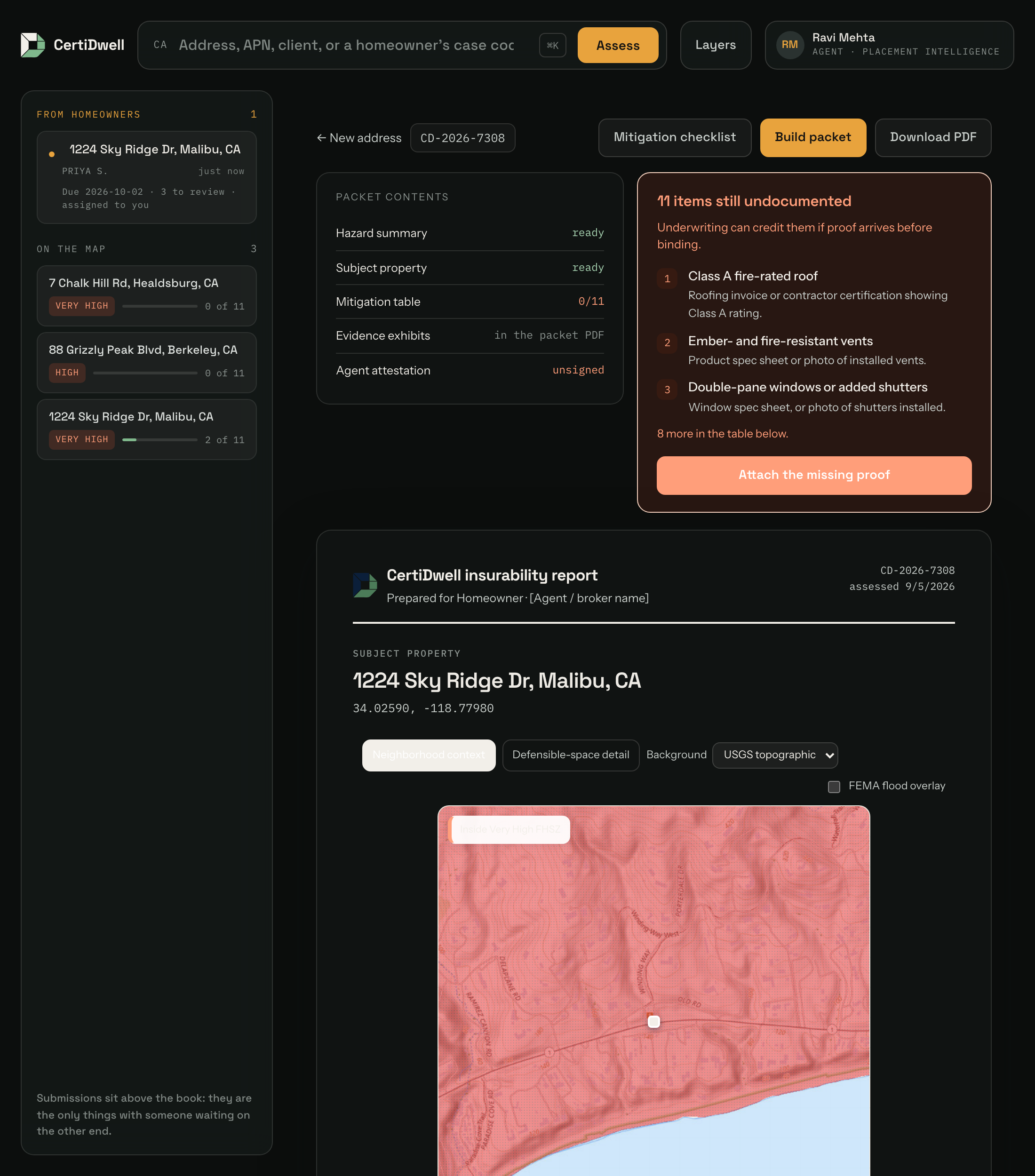
Type in an address, get the official risk facts
In a few seconds CertiDwell pulls, live, from the real government sources: the Fire Hazard Severity Zone from CAL FIRE (Moderate, High, or Very High) and the flood zone from FEMA.
Analogy: like typing an address into a property site and instantly getting the tax history — except these are the official hazard maps, separate from insurers’ pricing and risk models. It replaces visiting two government map websites and squinting at a map.
2. 2
Get the checklist of what actually earns a discount
The report lists the safety measures the state recognises — a Class A fire-rated roof, ember-resistant vents, clearing the five feet closest to the house, and so on, grouped into the structure, its immediate surroundings, and the wider community.
Why it helps: the agent is not relying on memory, and the homeowner gets a concrete to-do list. The list helps organize evidence for review; it cannot establish insurability or guarantee a discount.
3. 3
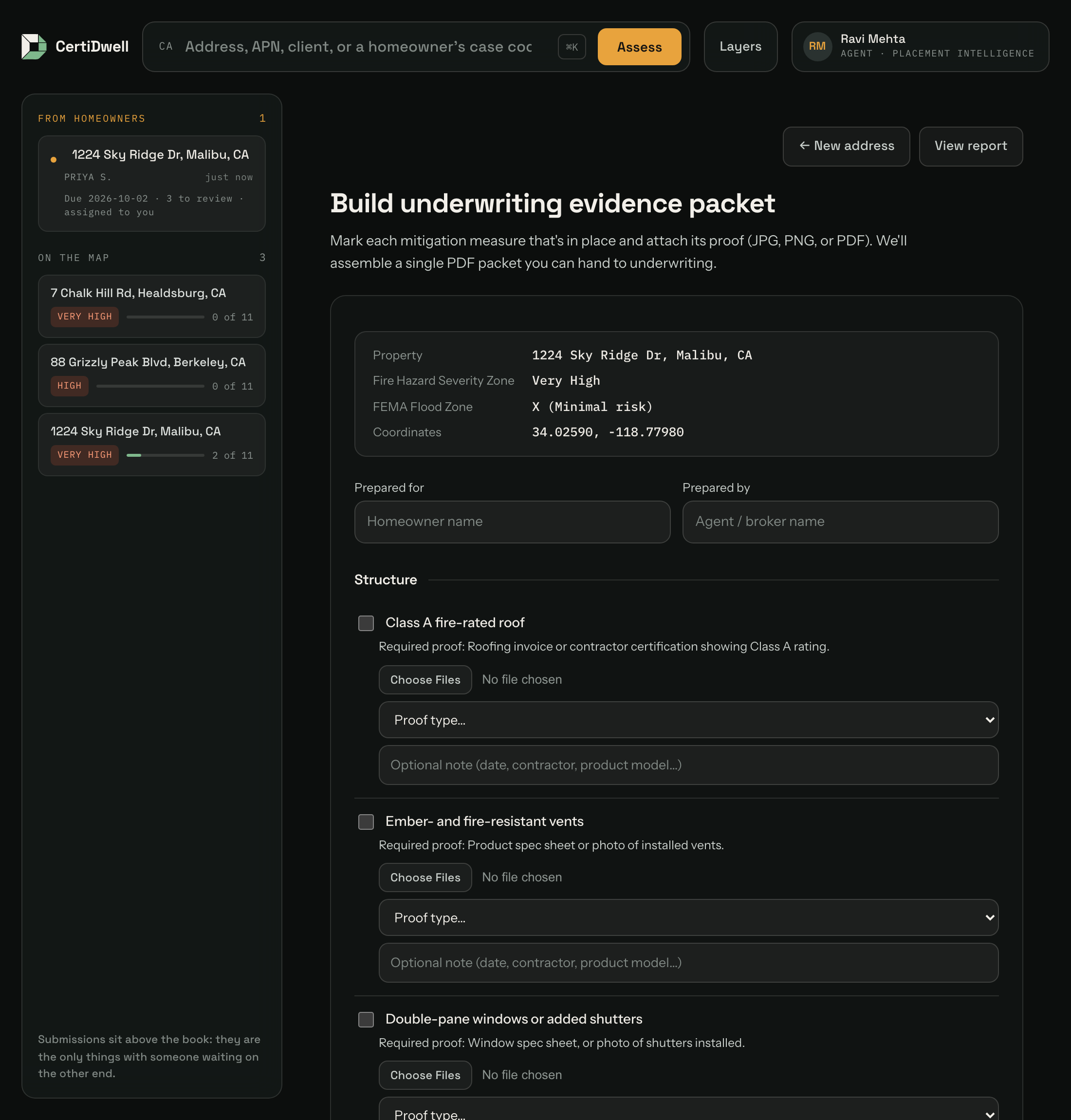
Collect the proof and generate one clean PDF
For each measure someone marks it done, tags what kind of proof it is (photo, contractor invoice, product spec sheet, certification letter, or self-certification), and attaches the file. CertiDwell assembles a single PDF: a cover sheet, a log of every measure and its status, then every photo and receipt attached and labelled.
Analogy: like a home inspection report, or a well-organised loan application — everything a decision-maker needs, in one file, in a predictable order. This is the actual deliverable.
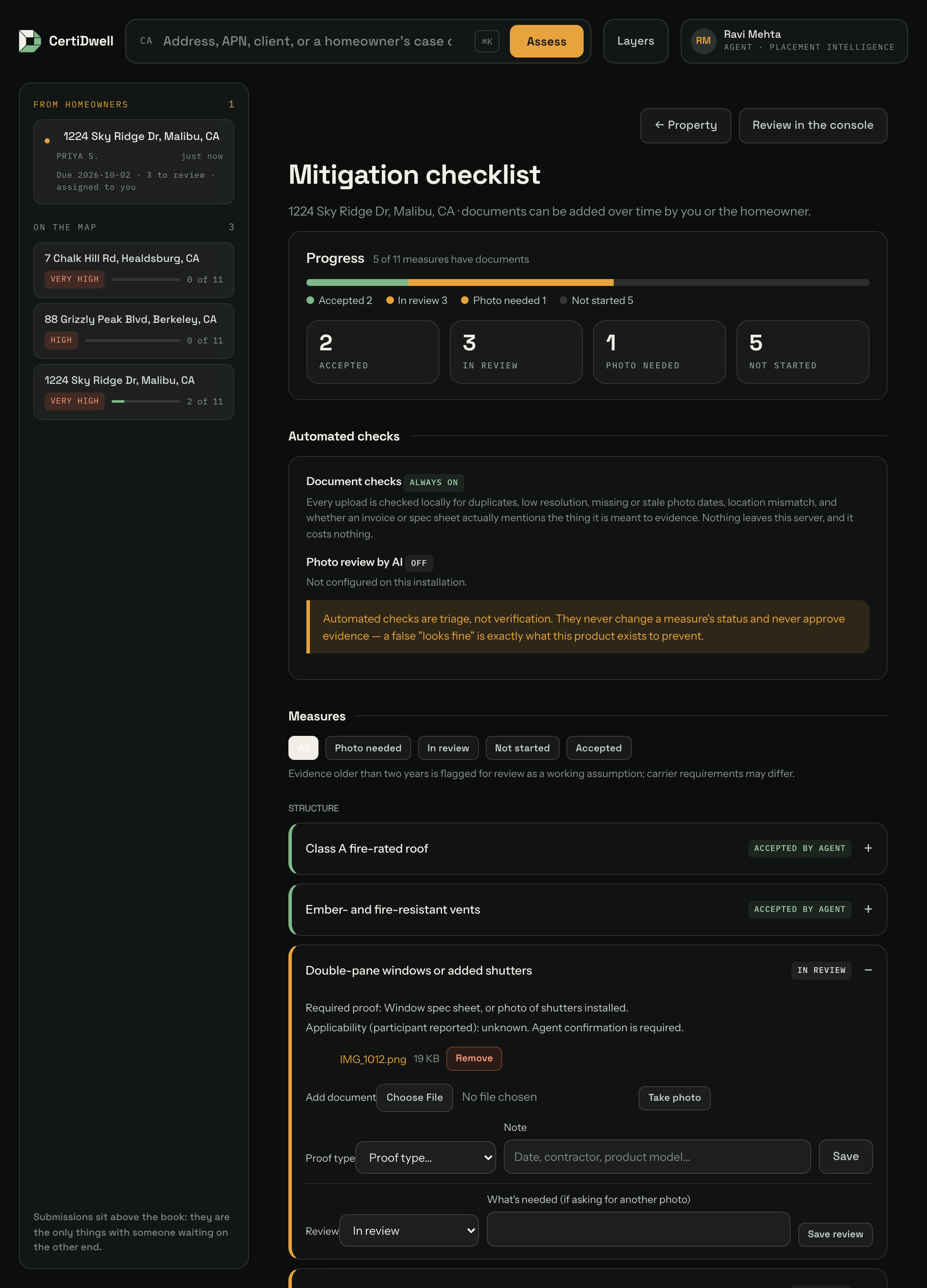
Crucially, this happens over weeks, not in one sitting. A roof invoice turns up today, the photos next weekend. The mitigation checklist holds it all as it arrives — either party can add to it, a progress bar shows what is still missing, and the agent can mark a measure accepted or ask for better proof, which emails the homeowner exactly what to re-shoot. When the homeowner is done they press a button that tells the agent they are ready.
Every upload is also checked automatically — is it a duplicate, is the photo too small or two years old, was it taken nowhere near the property, does that "roofing invoice" actually mention a Class A rating? On paid plans an AI can additionally look at photos and say whether they plausibly show the measure. All of it is triage, never approval: the agent still decides, because a false "verified" reaching an underwriter is the one thing this product must not do.
CertiDwell is also an installable Progressive Web App. An agent or homeowner can add it to a phone's Home Screen, take a new evidence photo from the checklist, receive deadline notifications when the operator enables Web Push, and return through notification deep links. Its offline behavior is deliberately conservative: the app shell is available, but property addresses, reports and evidence are never placed in the ordinary browser cache.
Generating a packet then creates a locked, version-numbered snapshot with a fingerprint, while the folder stays editable — so you always know which exact document went to which carrier.
3b. 3b
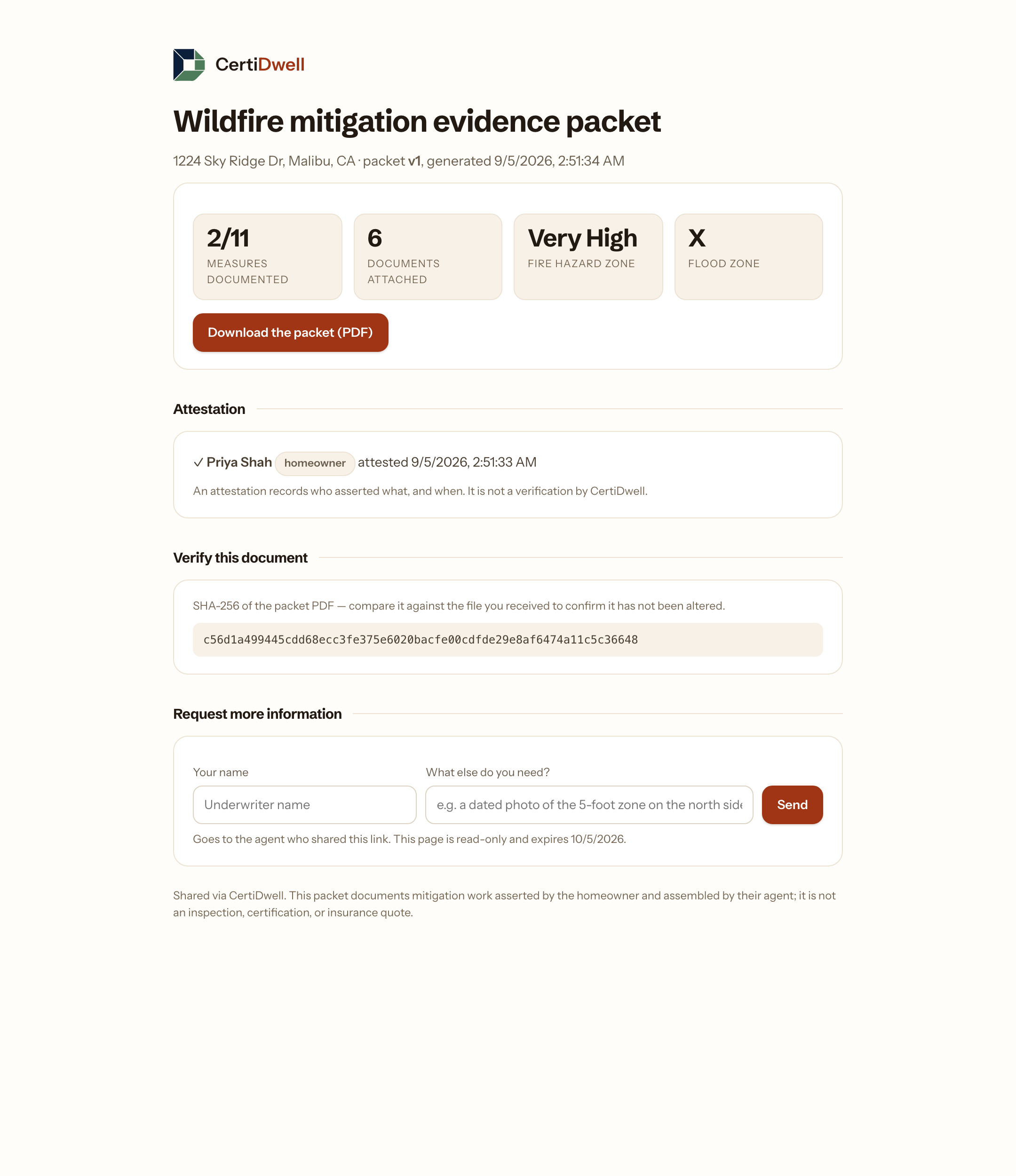
Hand it to the underwriter without either of them needing an account
The agent creates a read-only link, valid 30 days. The underwriter opens it in a browser: the summary, the PDF, who attested to what and when, a fingerprint they can check the file against, and a box to ask for anything missing — which lands back in the agent's folder.
Why it matters: underwriters work inside their carrier's own systems and will not adopt an agent's tool. A link asks nothing of them.
4. 4
Work out which insurer to approach
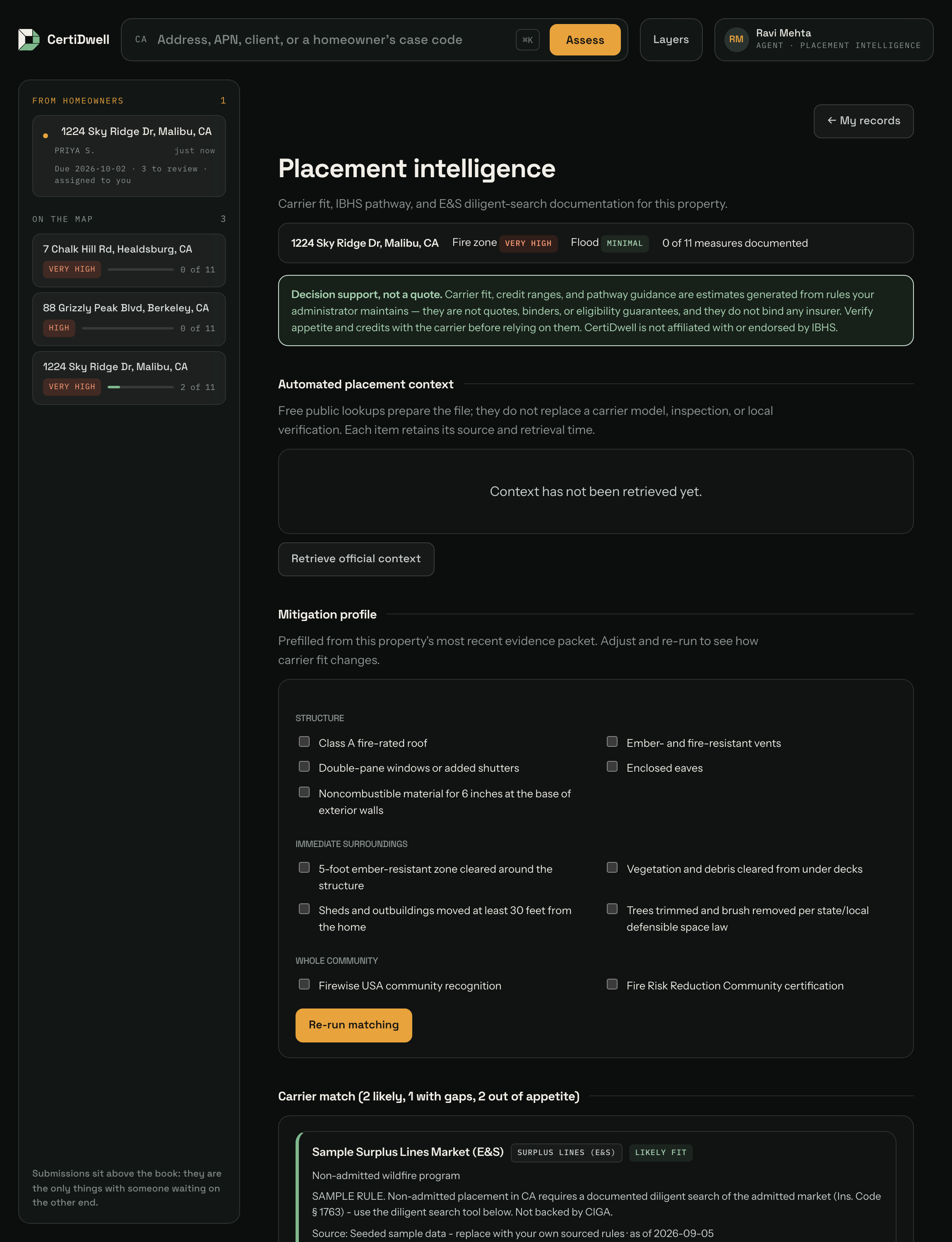
Given what the house has done and where it sits, CertiDwell shows which insurers are likely to say yes, which would say yes if a few more things were done (and exactly which), and which will not consider it at all. It also tracks progress toward the IBHS "Wildfire Prepared Home" designation that some insurers reward, and — when no normal insurer will take the risk — records the rejections California requires you to document before using the specialty market.
Before matching, the placement workspace can retrieve source-linked public context: Census jurisdiction plus regional CAL FIRE WUI and secondary-egress findings. The IBHS pathway identifies the standard edition and hands the user to IBHS's official portal while CertiDwell keeps an encrypted follow-through record. Carrier rules sourced from CDI filings enter through a pending-review queue and cannot affect matching until an administrator approves them.
Analogy: like a mortgage broker's tool that says "you would qualify with this lender, and with that one too if you paid down one credit card." It turns "call fifteen carriers and hope" into a ranked shortlist with a clear gap list.
Who uses it
There are three kinds of account: agent, homeowner and administrator.
| Person | What they get out of it |
|---|---|
| Insurance agent or broker the paying user | Hours saved per client, a professional document to submit, and a shortlist of carriers worth calling |
| Homeowner a free collaborator seat | A clear "do these things" list, credit for work already paid for, and somewhere to upload their own proof as they gather it |
| Administrator | Runs the system: manages users, reviews proposed filing rules, maintains the enhancement backlog, and reviews the audit log |
| Underwriter at the insurance company | A consistent, complete file instead of scattered emails and loose photos. They do not need an account — the packet travels to them |
The paying customer is the agent, not the homeowner. Agents feel this pain daily and repeatedly; a homeowner feels it once every few years. The homeowner seat exists to move work off the agent's desk — the homeowner chases and uploads their own documents — which is why it is free and included.
How the two work together
A property is the shared object. Either party can start: an agent can invite a homeowner to a property they are already working, or a homeowner can add their own address, gather documents alone, and invite an agent afterwards. Each property has one agent at a time — so an agent's work is never visible to a competitor — and the homeowner controls who that is.
Joining is never implicit. An invitation is emailed, and the person accepting must tick an explicit consent statement about what is being shared and why. That consent is stored as a dated record on the property.
What it deliberately does not do
This matters for trust, so it is stated plainly throughout the product itself:
- It does not sell insurance or give quotes. It prices nothing and binds nothing. The agent does that.
- It does not guarantee a discount or an approval. It organises evidence and suggests likely fits. The insurer decides.
- It does not certify anything itself. The IBHS designation comes from IBHS and their approved inspectors, not from us.
- It does not give legal advice. The diligent-search report is the agent's own record, not a legal filing.
- The carrier rules are only as good as what is loaded into it. The app ships with clearly-labelled sample rules under generic names; a real deployment replaces them with rules sourced from actual carrier guides.
On that last point. Real carrier appetite is not published in any single authoritative feed. Inventing eligibility rules and attaching them to a real insurer's name would be misinformation that someone could act on, so the seeded data uses placeholder names and every rule records where it came from and when it was verified.
How it makes money
| Tier | Price | What it adds | Status |
|---|---|---|---|
| Free | Free | One new agent property assessment; existing files retained; free homeowner collaboration | Built |
| Pay-per-report | $20 / report ($15 each in the 10-pack) | Additional new property assessments, with ongoing access to their evidence files | Built |
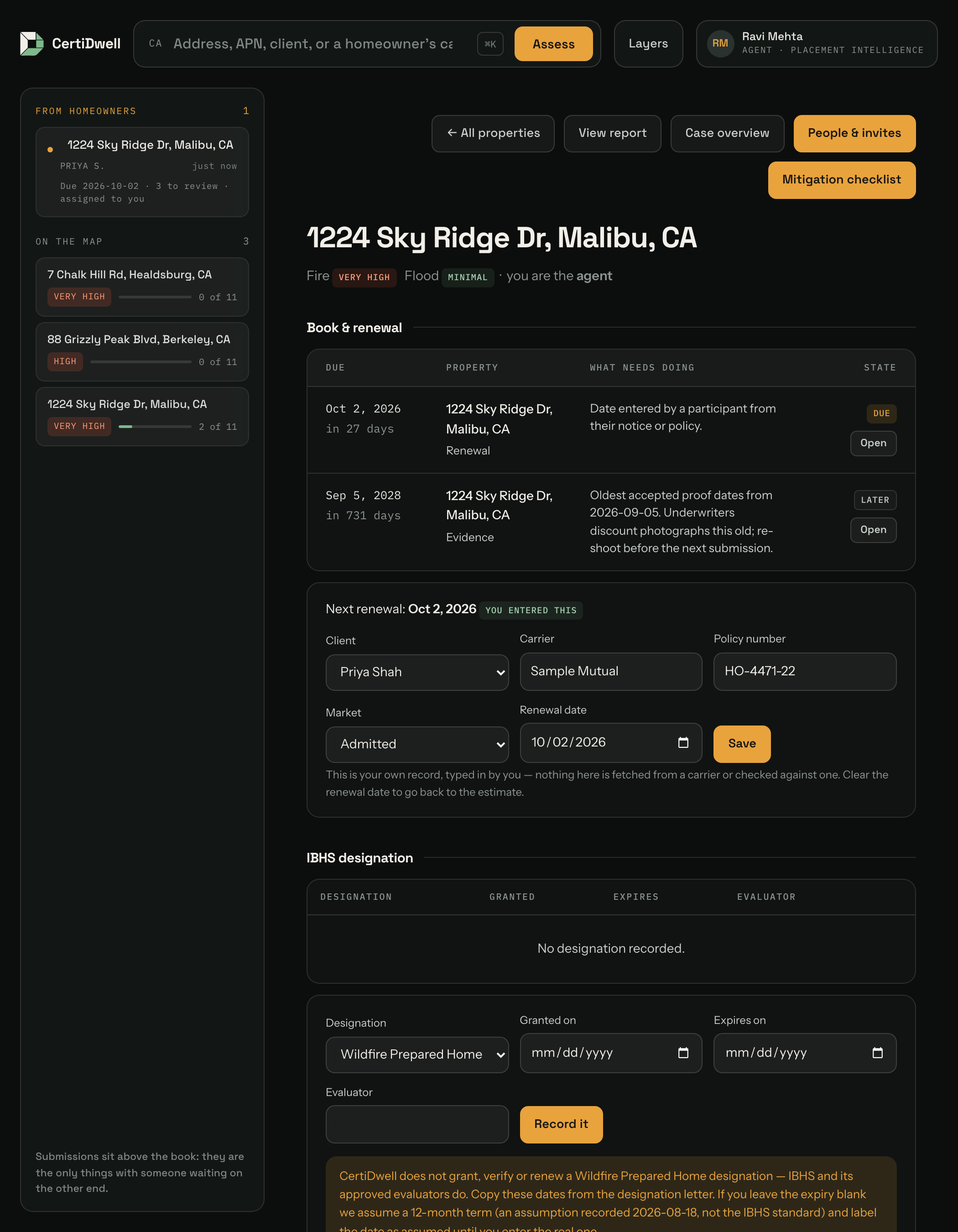
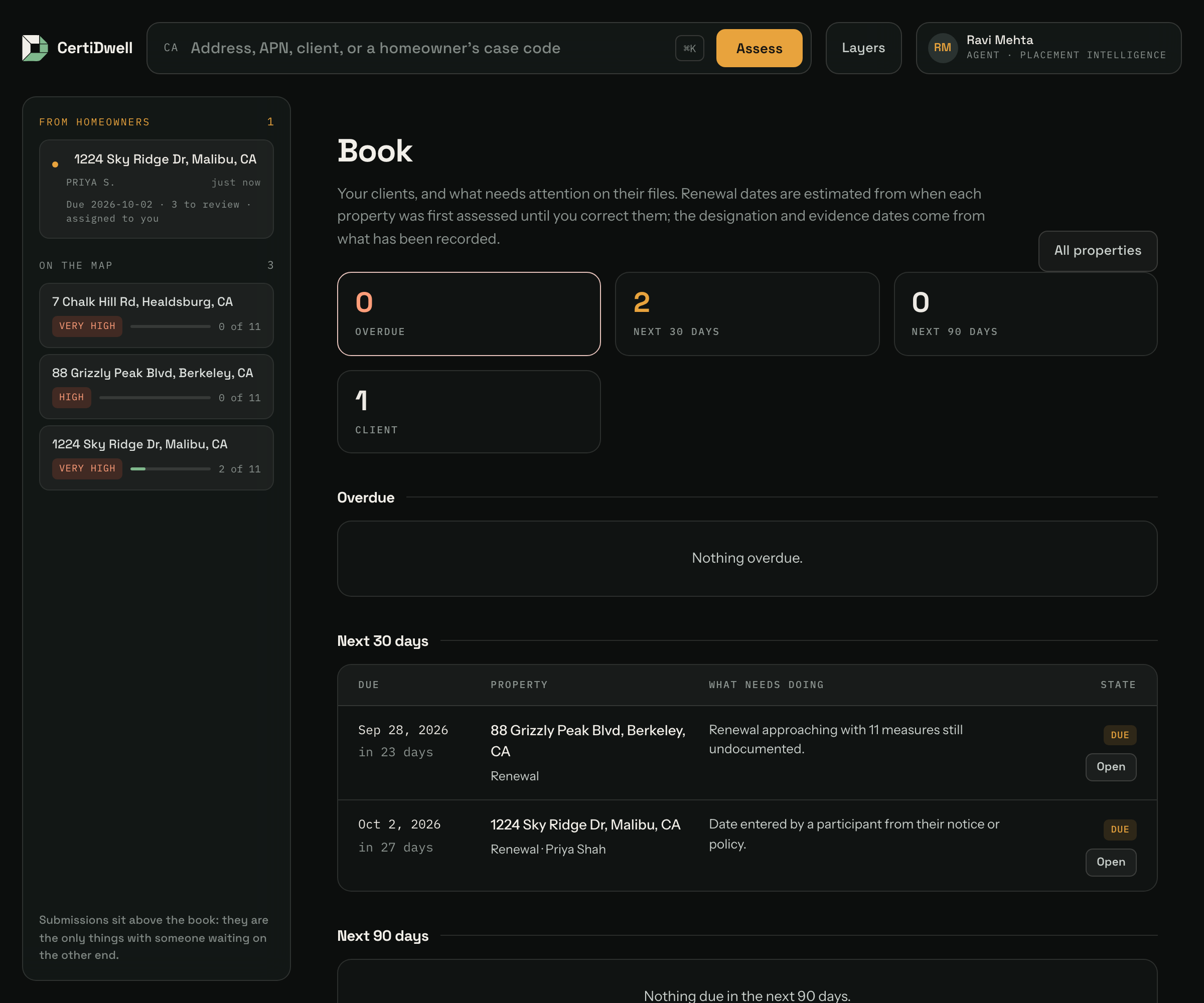
| Book management | $39 / agent / mo | Client list, renewal and IBHS recertification deadlines, daily digest | Built |
| Placement intelligence | $99 / agent / mo | Carrier matching, IBHS pathway, diligent-search docs | Planned |
| Agency scale | $199 / agency / mo | Integrations, multi-seat, bulk screening | Planned |
Each price is one number, not a range, and it is the number Stripe is configured to charge. A range on the page and a different amount at checkout is a quote the product does not honour.
The logic: the free tier is the on-ramp and pay-per-report is the low-commitment step up. The agent workspace supports repeated collection, review and deadline management. Placement intelligence remains unavailable until its data is validated.
Record the actual deadline from a policy or non-renewal notice. Participants can save it on the case, and agents can import dates for existing properties. The book prioritizes an entered deadline over its estimated reminder. General evidence-refresh reminders are preparation prompts, not carrier requirements.
Placement intelligence is built but not sold. The workspace works end to end, but the two things that would justify a monthly seat fee — matching a mitigation profile against real carrier appetite, and referring the client to a vetted IBHS evaluator — still run on clearly-labelled sample rules and a placeholder evaluator list. Charging for that would be charging for the demo, so the tier sits at Planned until the data behind it is real. Administrators can still assign it by hand, and its Stripe price and webhook path stay wired for the day it ships.

Where it stands today
Scope today is California wildfire only, running at certidwell.io, where buying credits charges the card you enter. The pricing page always says which it is doing: a quiet note when payments are real, and a banner when they are not — no processor connected, or Stripe in test mode.
Glossary
| Term | Plain meaning |
|---|---|
| Carrier | An insurance company |
| Underwriter | The person at the insurer who decides yes or no, and at what price |
| Premium | What you pay for the policy |
| FHSZ Fire Hazard Severity Zone | The state's official wildfire risk rating for a location |
| FEMA flood zone | The federal flood risk rating for a location |
| Mitigation | Work done to make a property less likely to be damaged |
| Safer from Wildfires | California's rule listing safety measures that must earn a discount |
| Defensible space | Cleared area around a house that slows an approaching fire |
| Ember-resistant zone | The critical first five feet around the house — most homes burn from flying embers, not the fire front |
| Admitted carrier | A normal, state-regulated insurer with state backstop protections |
| E&S / surplus lines | Specialty insurers for risks normal ones will not take — more expensive, fewer protections |
| Diligent search | The required proof that an agent tried normal insurers before using the specialty market |
| FAIR Plan | California's insurer of last resort — expensive, limited coverage |
| IBHS | A safety research organisation; its "Wildfire Prepared Home" designation is a recognised standard some insurers reward |
| Evidence packet | The PDF this app produces: proof of all mitigation work in one file |